Recall: two kinds of encryption schemes.
- E is encrypt, D is decrypt
- Symmetric key cryptography means the same key is used to encrypt & decrypt
- ciphertext = E_k(plaintext)
- plaintext = D_k(ciphertext)
- Asymmetric key(public key) cryptography: encrypt & decrypt keys differ,
- ciphertext = E_PK(plaintext)
- plaintext = D_SK(ciphertext)
PKandSKare public and secret(private) keys, respectively.
- Public key cryptography is orders of magnitude slower than symmetric
How key exchange works today
The most famous cryptographic protocol for key exchange is Diffie–Hellman, published in 1976 by Whitfield Diffie and Martin Hellman. Diffie–Hellman allows the creation of a shared secret between a sender and receiver. This shared secret is unable to be deduced by an eavesdropper who is observing the messages between the sender and receiver, except via a brute force attack. If the keyspace for the shared secret is large enough and the secret generated is sufficiently random, brute force attacks become nearly impossible. source: https://developer.okta.com/books/api-security/tls/key-exchange/
Terminology
- Certificate (cert)
The public half of a public/private key pair with some additional metadata about who issued it etc. It may be freely given to anyone.
- Private Key
A private key can verify that its corresponding certificate/public key was used to encrypt data. It is never given out publicly.
- Certificate Authority (CA)
A company that issues digital certificates. For SSL/TLS certificates, there are a small number of providers (e.g. Symantec/Versign/Thawte, Comodo, GoDaddy, LetsEncrypt) whose certificates are included by most browsers and Operating Systems. They serve the purpose of a “trusted third party”.
- Certificate Signing Request (CSR)
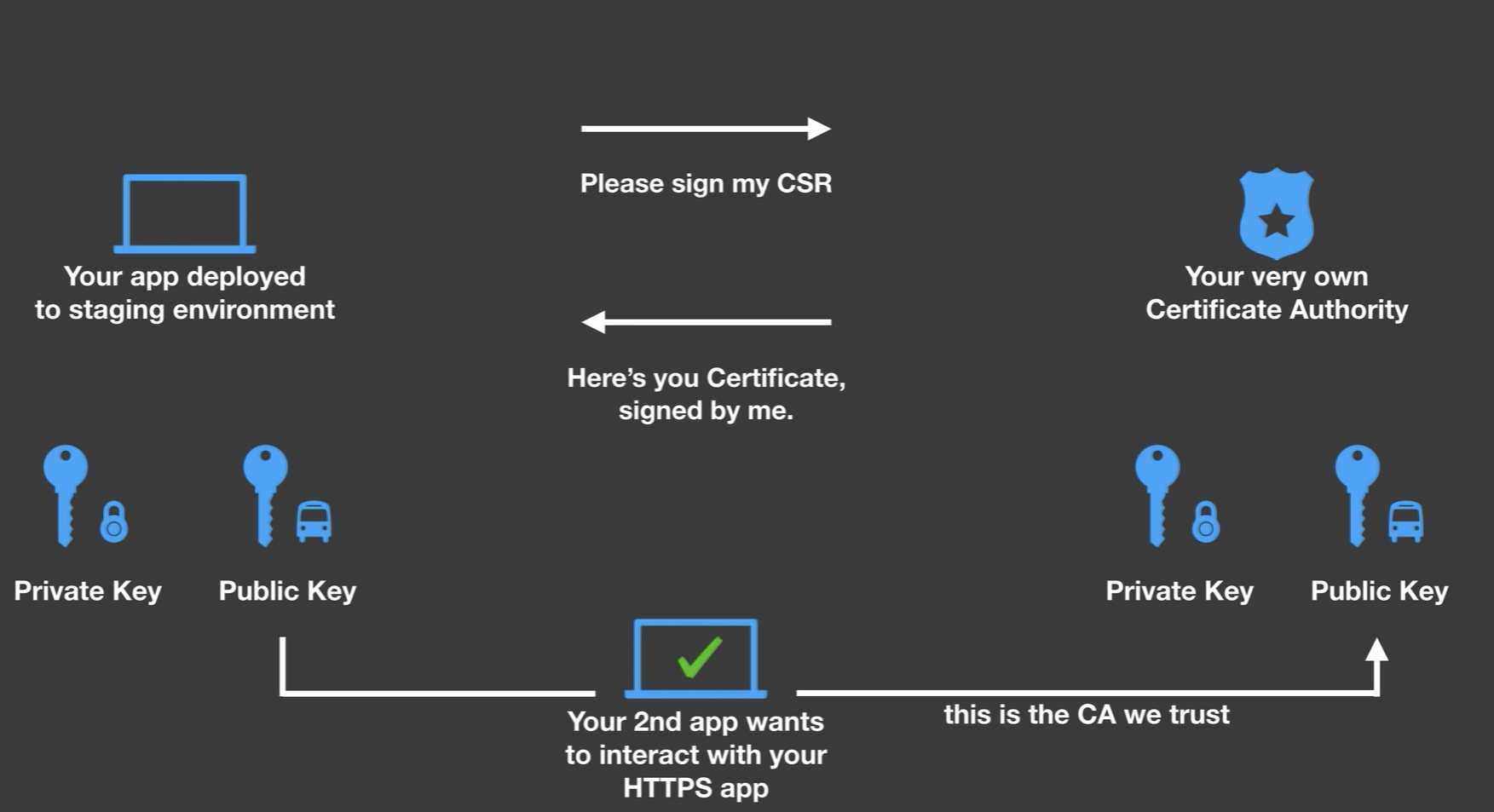
A file generated with a private key. A CSR can be sent to a CA to request to be signed. The CA uses its private key to digitally sign the CSR and create a signed cert. Browsers can then use the CA’s cert to validate the new cert has been approved by the CA.
- HTTPS
Also called HTTP over SSL/TLS, is an extension of HTTP which encrypts communication. HTTPS URLs begin with “https://” and use port 443 by default. This is an improvement over HTTP, which is vulnerable to eavesdropping and man-in-the-middle attacks.
- SSL
Secure Sockets Layer was released by Netscape in 1995. SSL adoption increased after the redesigned SSL 3.0 was released in 1996. The IETF prohibited SSL 2.0 in 2011. SSL 3.0 was prohibited in 2015 after the IETF identified various security vulnerabilities which affected all SSL 3.0 ciphers.
- TLS
Transport Layer Security is the successor to SSL. In fact, the documentation for TLS 1.0 describes it as an “upgrade” of SSL 3.0. The current TLS version is 1.3. Although virtually all HTTPS-secured traffic uses TLS due to problems with SSL, the SSL nomenclature persists in internet culture. These days, when somebody says SSL, it is likely they mean TLS.
HTTPS
The Hypertext Transfer Protocol (HTTP) is the basic communication protocol that both clients and servers must implement in order to be able to communicate. It covers things such as requests and responses, sessions, caching, authentication and more.
The protocol transfers information between the browser and the server in clear text, allowing the network, through which the information passes, to see the information transmitted. This is a security concern, so HTTP Secure (HTTPS) was introduced, allowing the client and the server to first establish an encrypted communication channel, and then pass the clear text HTTP messages through it, effectively protecting them from eavesdropping.
The encrypted channel is created using the Transport Layer Security (TLS) protocol, previously called Secure Socket Layer (SSL).
Browser to Youtube.com
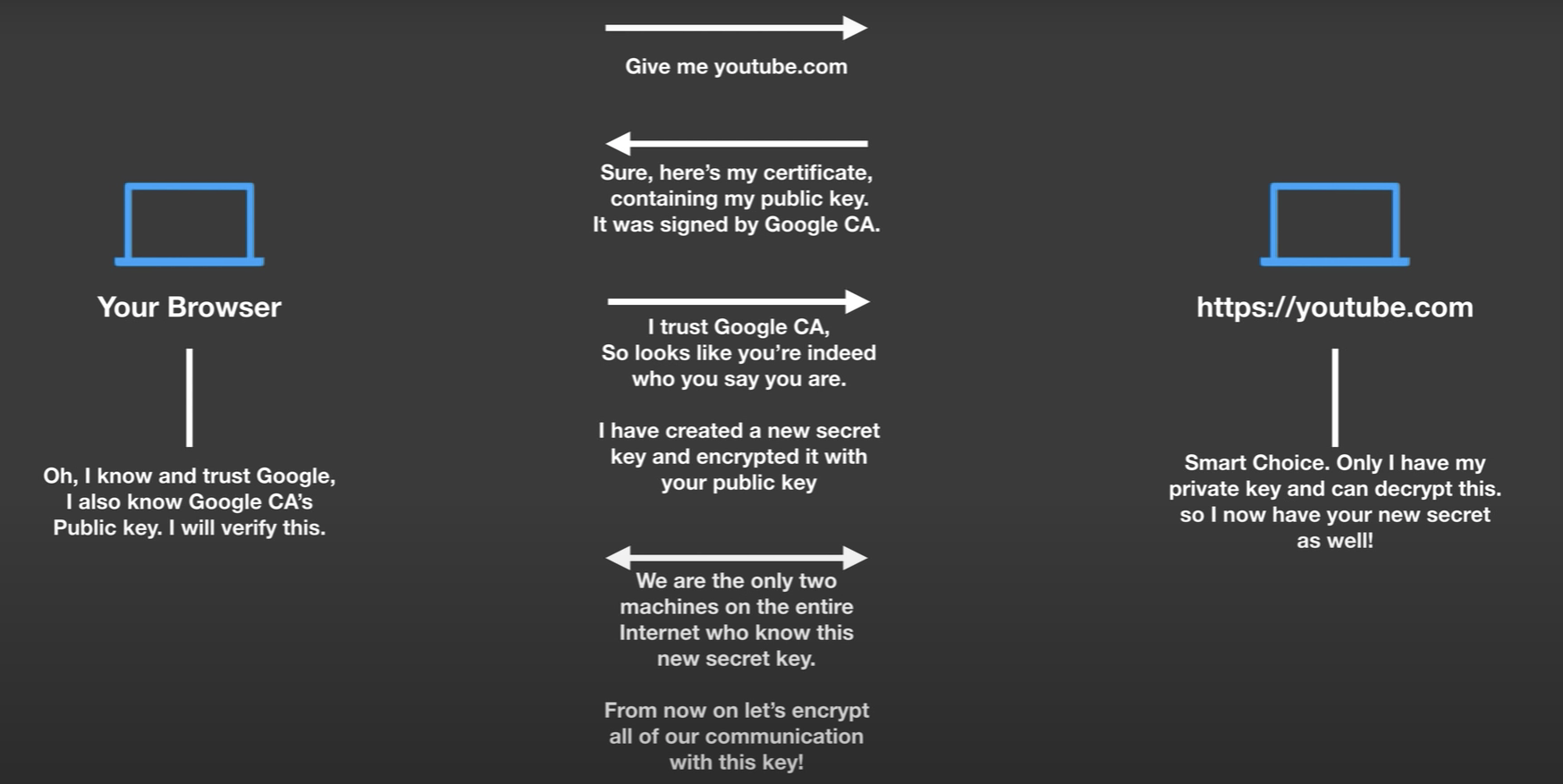
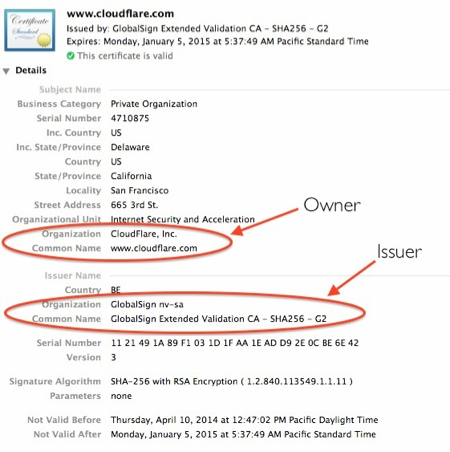
How Youtube.com creates his cert and how it is signed by Google CA. Every computer maintains a list of certificates which it trusts and are known to be legitimate.
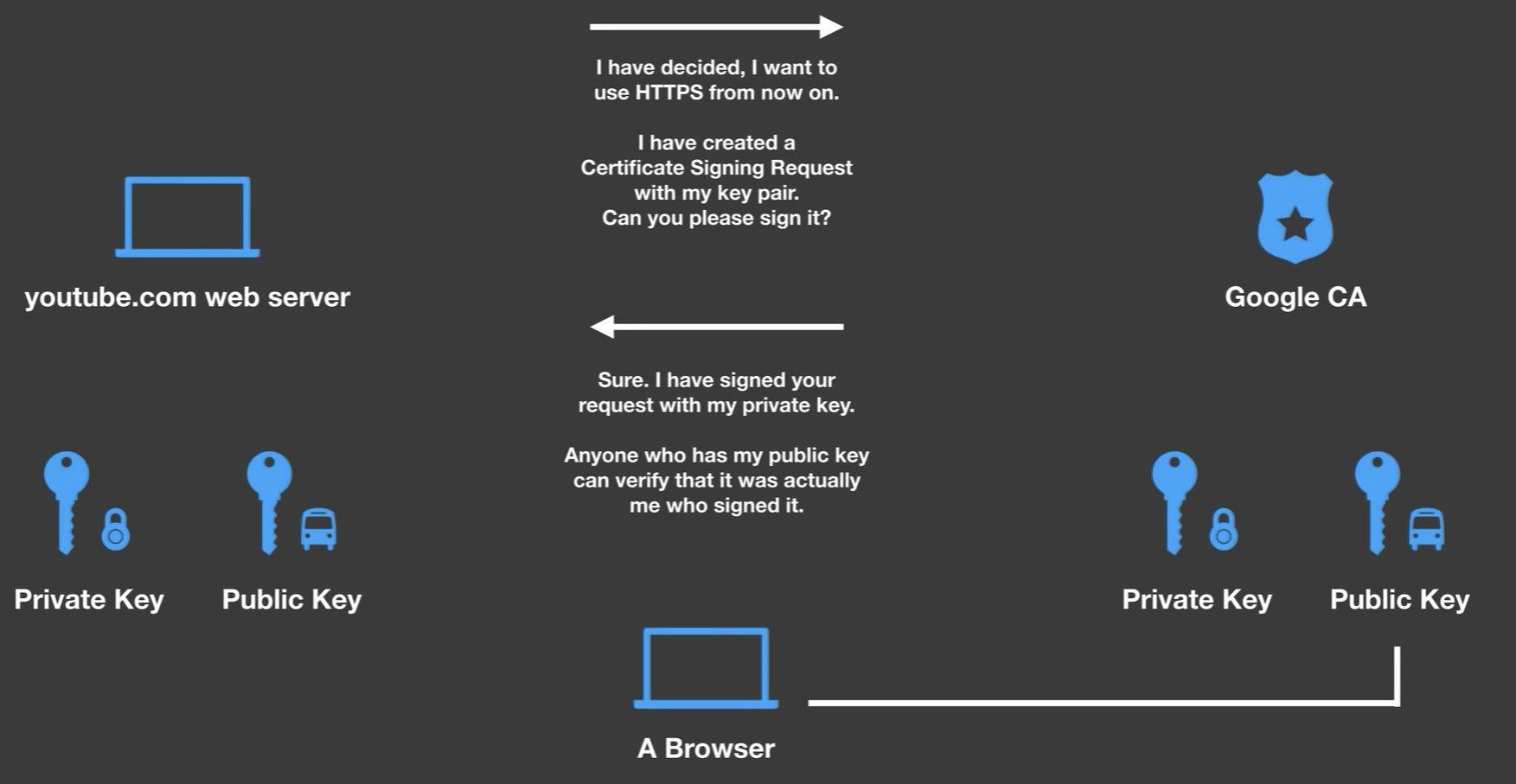
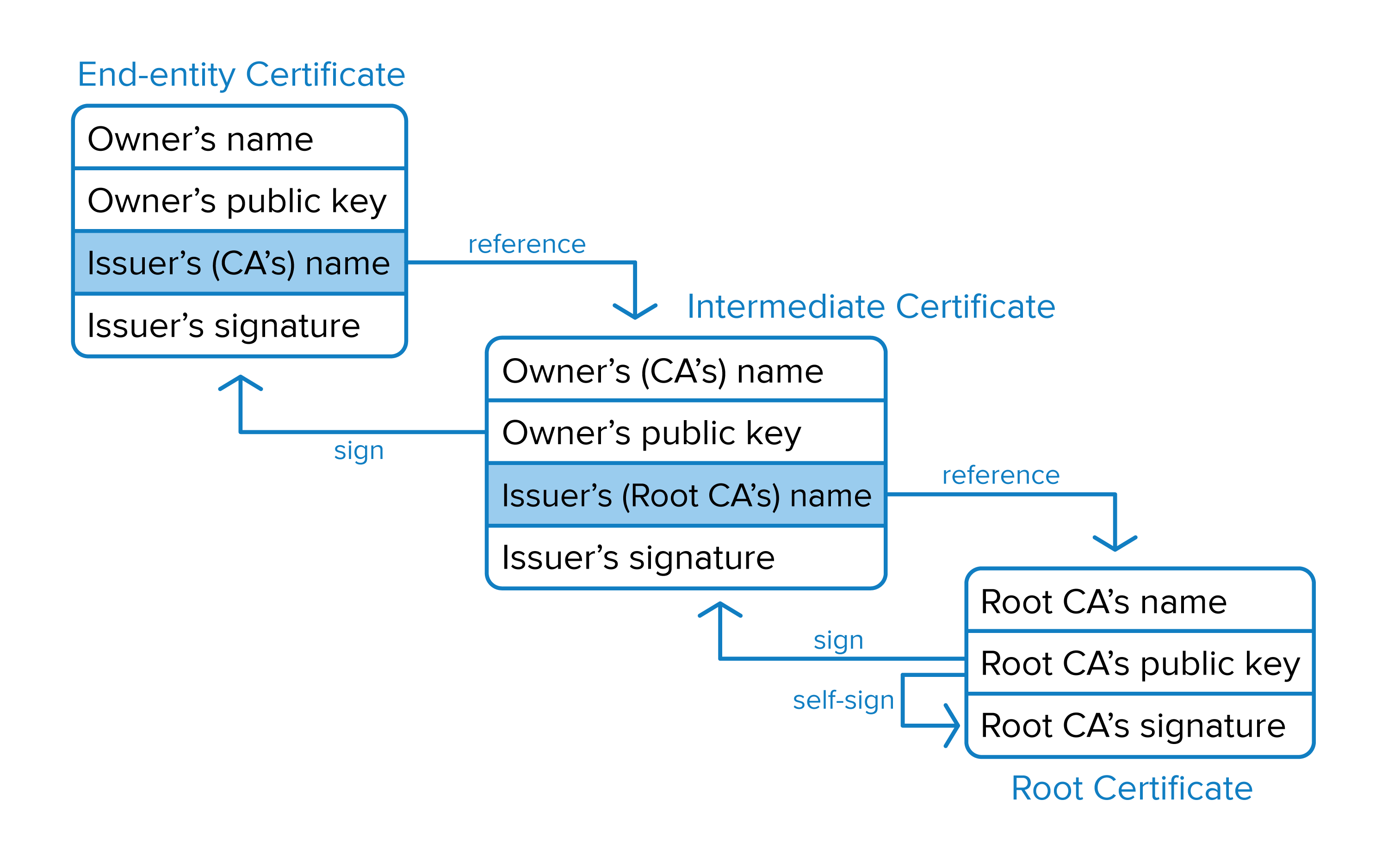
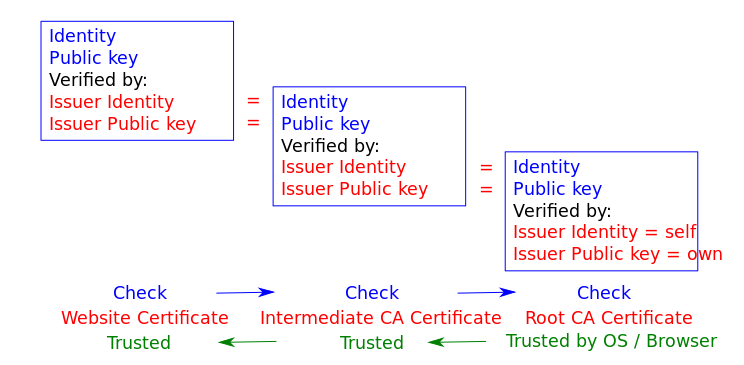
Certification authorities (CAs) are organizations trusted to sign certificates. Operating systems, such as Windows, macOS, iOS and Android, as well as the Firefox browser, have a list of trusted certificates. Chain of Trust
Managing our own CA
There are lots of ways for a client to authenticate itself against a server, including basic authentication, form-based authentication, and OAuth.
To prevent exposing user credentials over the wire, the client communicates with the server over HTTPS, and the server’s identify is confirmed by validating its SSL certificate. The server doesn’t necessarily care who the client is, just as long as they have the correct credentials.
An even higher level of security can be gained with using SSL certificates for both the client and the server. source: http://www.robinhowlett.com/blog/2016/01/05/everything-you-ever-wanted-to-know-about-ssl-but-were-afraid-to-ask/
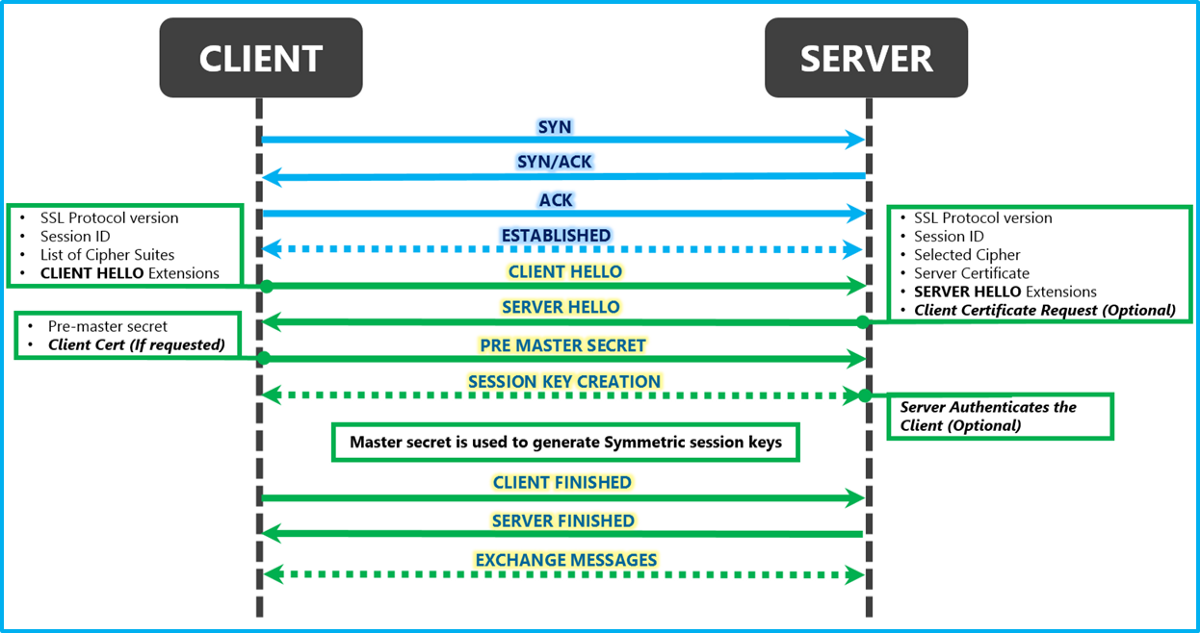
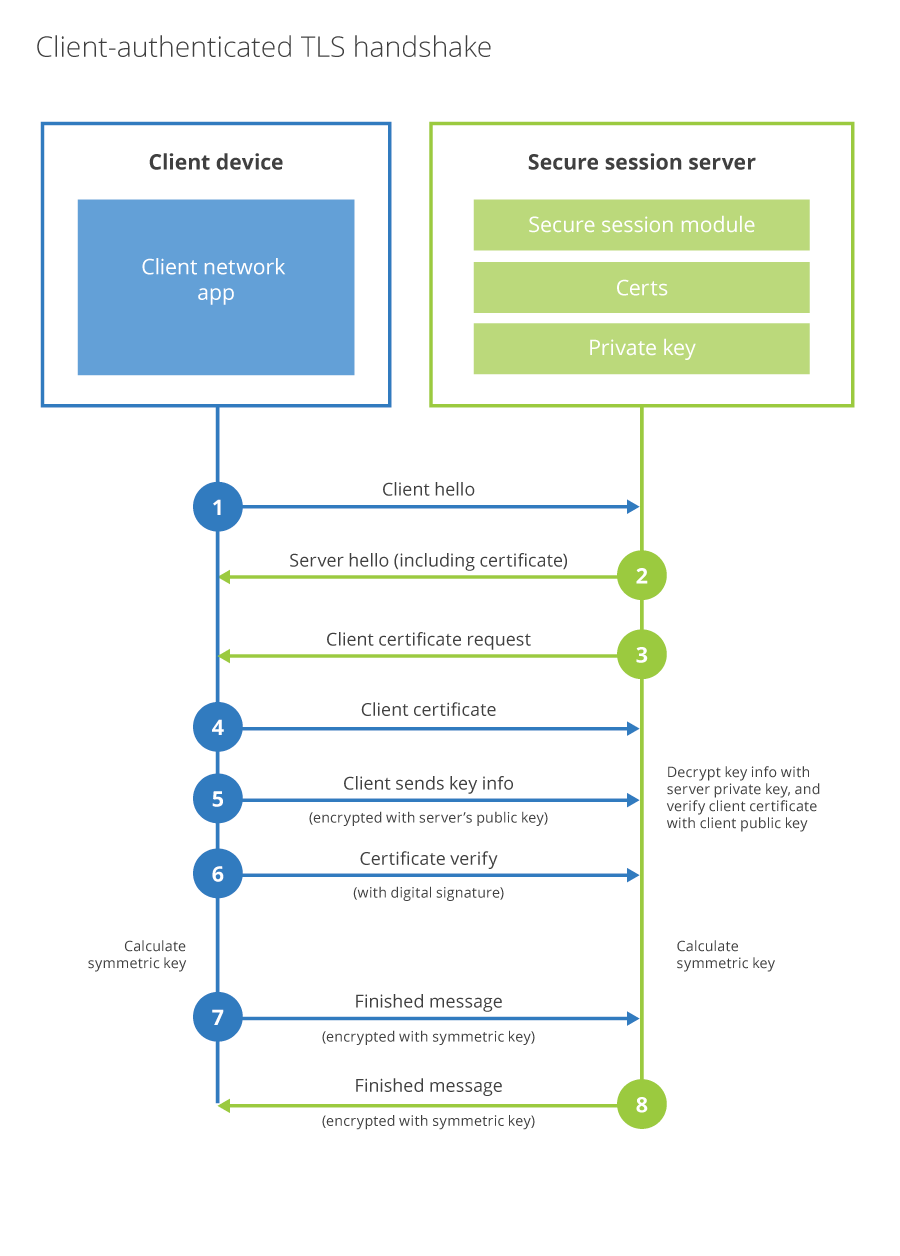
In a traditional TLS handshake, the client authenticates the server, and the server doesn’t know too much about the client. In Client side TLS(TLS with client authentication), the server additionally authenticates that the client connecting to it is authorized to connect. TLS Client Authentication is useful in cases where a server is keeping track of hundreds of thousands or millions of clients. In the case of a mobile banking app, where the bank wants to ensure customers’ secure financial data doesn’t get stolen by bots spoofing their mobile app, they can issue a unique certificate to every app install and in the TLS handshake validate requests are coming from their mobile app.
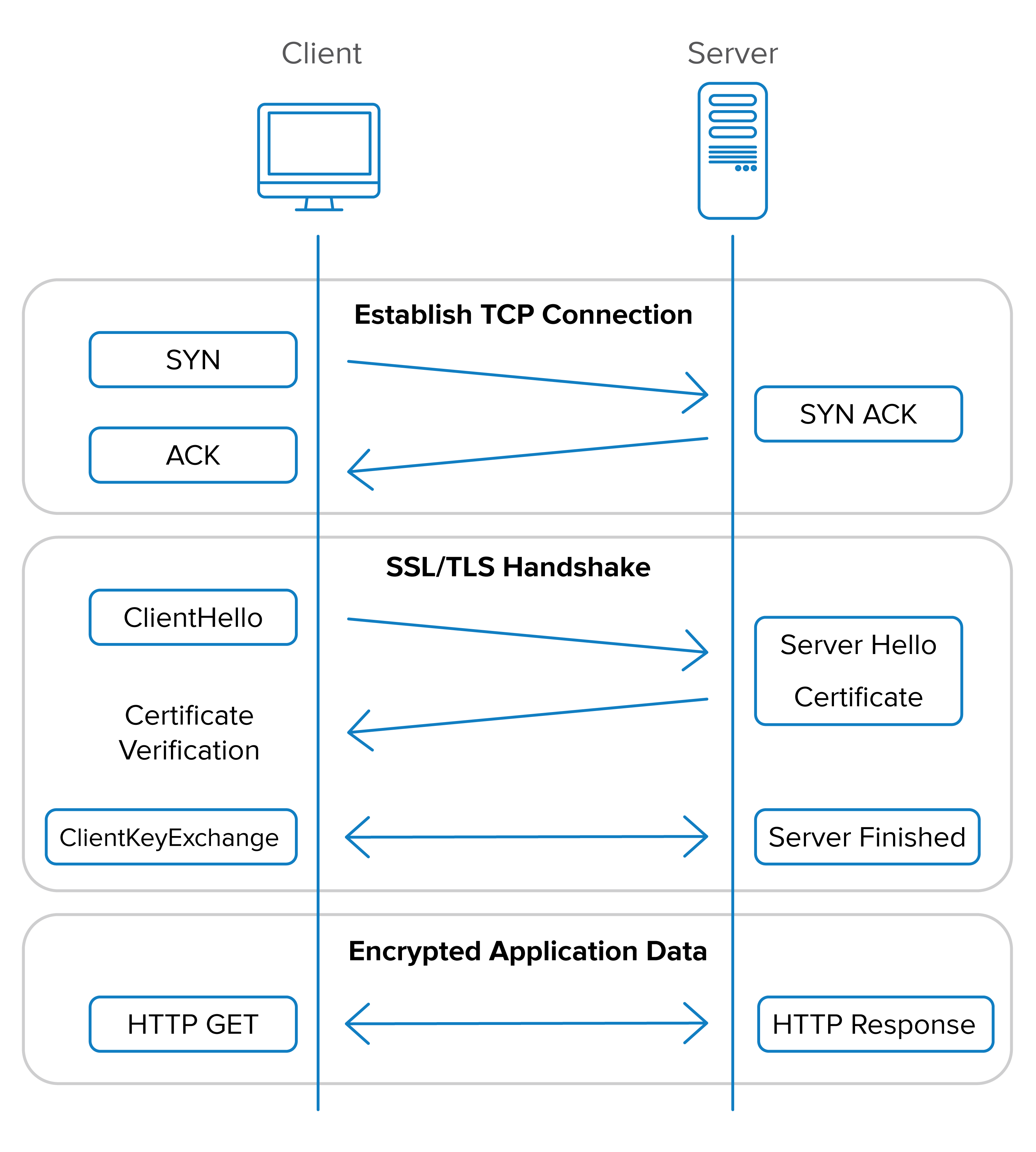
SYN, SYN ACK, ACK happens as part of TCP, Cert handshake happens as part of TLS
mTLS
Production Setup
What Is TLS?
TLS (Transport Layer Security) encrypts communication between two parties and lets the client verify the server’s identity. When you visit https://google.com, your browser checks Google’s certificate to confirm you’re talking to the real Google — not an impersonator.
But Google has no idea who you are at the transport layer. You’re anonymous until you log in with a password or OAuth token.
What Is mTLS?
Mutual TLS adds one thing: the server also verifies the client. Both sides present certificates, and both sides check the other’s certificate against a trusted Certificate Authority (CA).
| No TLS | TLS | mTLS | |
|---|---|---|---|
| Traffic encrypted | No | Yes | Yes |
| Server proves identity | No | Yes | Yes |
| Client proves identity | No | No | Yes |
Why Not Just Use TLS Everywhere?
TLS works when the server doesn’t need to know who the client is at the transport level:
- Google has billions of users on random devices. It can’t install a certificate on every laptop and phone. Instead, it verifies identity after the TLS connection is up — via passwords, OAuth, passkeys.
- Internal microservices are different. There are a finite number of known services, all deployed by the same organization. You can issue a certificate to every single one.
You → Google:
  - 4 billion potential clients
  - Can't pre-install certs on every device
  - Identity verified at app layer (password/OAuth)

service-A → service-B:
  - Handful of known services
  - Organization controls all of them
  - Identity verified at transport layer (certificate)
The Three Files
Every service in an mTLS setup needs three things:
| File | What It Is | What It’s For |
|---|---|---|
ca.crt |
CA certificate | Verify the peer’s certificate (“do I trust who signed this?”) |
client.crt |
This service’s certificate | Present to the peer (“here’s who I am”) |
client.key |
This service’s private key | Prove ownership of the certificate (“proof I’m not lying”) |
The CA (Certificate Authority) is the root of trust. It signs every service’s certificate. During the handshake, each side checks: “Was the peer’s cert signed by a CA I trust?”
                    ┌─────────────────┐
                    │  Certificate    │
                    │  Authority (CA) │
                    └────────┬────────┘
                             │ signs
              ┌──────────────┼──────────────┐
              ▼              ▼              ▼
        ┌───────────┐  ┌───────────┐  ┌───────────┐
        │ Service A │  │ Service B │  │ Service C │
        │   cert    │  │   cert    │  │   cert    │
        └───────────┘  └───────────┘  └───────────┘
The Handshake
  Client                                     Server
    │                                          │
 1. │─── ClientHello (supported ciphers) ─────▶│
    │                                          │
 2. │◀── ServerHello + server.crt ─────────────│
    │◀── CertificateRequest ───────────────────│  ← "show me YOUR cert"
    │                                          │
 3. │ Verify server.crt against ca.crt         │
    │ ✓ Signed by trusted CA?                  │
    │ ✓ Server name matches?                   │
    │                                          │
 4. │──── client.crt ─────────────────────────▶│
    │──── Proof signed with client.key ───────▶│  ← proves ownership
    │                                          │
 5. │                    Verify client.crt     │
    │                    against ca.crt        │
    │                    ✓ Signed by trusted CA│
    │                    ✓ Key matches cert    │
    │                                          │
 6. │◀═─══════ Encrypted channel ═════════════▶│
The private key is never sent over the wire. The client uses it to sign a challenge, and the server verifies that signature using the client’s public certificate.
Python Examples
No TLS — Plaintext
import grpc

channel = grpc.insecure_channel("server:50051")
stub = MyServiceStub(channel)

# Traffic is unencrypted. Anyone on the network can read it.
# Neither side proves identity.
TLS — Only Server Proves Identity
import grpc

with open("ca.crt", "rb") as f:
    ca_cert = f.read()

creds = grpc.ssl_channel_credentials(
    root_certificates=ca_cert,    # used to verify the server's cert
)

channel = grpc.secure_channel("server:50051", creds)
stub = MyServiceStub(channel)

# Traffic is encrypted.
# Client verifies: "I'm really talking to the server, not an impersonator."
# Server has no idea who the client is.
mTLS — Both Sides Prove Identity
import grpc

with open("ca.crt", "rb") as f:
    ca_cert = f.read()

with open("client.crt", "rb") as f:
    client_cert = f.read()

with open("client.key", "rb") as f:
    client_key = f.read()

creds = grpc.ssl_channel_credentials(
    root_certificates=ca_cert,        # verify the server
    private_key=client_key,           # prove I own my cert
    certificate_chain=client_cert,    # present my identity
)

channel = grpc.secure_channel("server:50051", creds)
stub = MyServiceStub(channel)

# Traffic is encrypted.
# Client verifies the server. Server verifies the client.
# Both sides proved identity before any data was exchanged.
The difference is just two extra arguments: private_key and certificate_chain.
Server Side — Requiring Client Certs
import grpc

with open("ca.crt", "rb") as f:
    ca_cert = f.read()

with open("server.crt", "rb") as f:
    server_cert = f.read()

with open("server.key", "rb") as f:
    server_key = f.read()

creds = grpc.ssl_server_credentials(
    [(server_key, server_cert)],
    root_certificates=ca_cert,       # CA to verify client certs
    require_client_auth=True,        # ← THIS makes it mutual
)

server = grpc.server(futures.ThreadPoolExecutor())
server.add_secure_port("[::]:50051", creds)
Without require_client_auth=True, the server never asks for a client cert — that’s regular TLS. With it, any client without a valid cert is rejected at the handshake.
Go Example
// mTLS client
cert, _ := tls.X509KeyPair(certPEM, keyPEM)

caPool := x509.NewCertPool()
caPool.AppendCertsFromPEM(caPEM)

tlsConfig := &tls.Config{
    Certificates: []tls.Certificate{cert},   // my identity
    RootCAs:      caPool,                    // who I trust
}

conn, _ := grpc.DialContext(ctx, addr,
    grpc.WithTransportCredentials(credentials.NewTLS(tlsConfig)),
)
// mTLS server
tlsConfig := &tls.Config{
    Certificates: []tls.Certificate{cert},
    ClientAuth:   tls.RequireAndVerifyClientCert,  // demand client cert
    ClientCAs:    caPool,                          // verify against CA
    RootCAs:      caPool,
    MinVersion:   tls.VersionTLS12,
}

creds := credentials.NewTLS(tlsConfig)
server := grpc.NewServer(grpc.Creds(creds))
Why mTLS Matters: The Network Is Not a Security Boundary
Traditional security assumes everything inside the firewall is trusted. mTLS assumes nothing is trusted — this is zero trust.
WITHOUT mTLS (perimeter security):

  ┌──────────── Internal Network ───────────────┐
  │                                             │
  │   Attacker ──── "give me data" ────▶ DB     │
  │   (got in via exploit)               "ok"   │
  │                                             │
  │   Nothing verifies who's connecting.        │
  └─────────────────────────────────────────────┘

WITH mTLS (zero trust):

  ┌───────────── Internal Network ──────────────┐
  │                                             │
  │   Attacker ──── "give me data" ────▶ DB     │
  │                                     "show   │
  │   has no valid cert                  me     │
  │                                     your    │
  │   ??? ─────────────────────────────▶ cert"  │
  │                                     REJECTED│
  └─────────────────────────────────────────────┘
Keeping Certificates Secure
mTLS is only as strong as the security of the private keys. Common practices:
| Threat | Protection |
|---|---|
| Certs stolen from disk | Mount as tmpfs (in-memory only, never written to disk) |
| One service impersonates another | Each service gets its own unique cert — compromise of one doesn’t affect others |
| Stolen cert used forever | Short-lived certs with automatic rotation — expired certs are useless |
| Attacker accesses cert store | Secrets stored in Vault or K8s Secrets with strict access policies |
| Compromised service does everything | Layer authorization (JWT, RBAC) on top — cert proves who you are, authz controls what you can do |
| Compromised service reaches all other services | Network policies restrict which services can talk to which |
The Mental Model
┌────────────────────────────────────────┐
│         Transport Layer (mTLS)         │
│                                        │
│  "Are you a legitimate service?"       │
│  Verified via certificates during      │
│  TLS handshake. No cert = no conn.     │
├────────────────────────────────────────┤
│        Application Layer (JWT/RBAC)    │
│                                        │
│  "What are you allowed to do?"         │
│  Verified per-request. Identity alone  │
│  doesn't grant access to everything.   │
└────────────────────────────────────────┘
mTLS handles authentication (who are you?). Authorization (what can you do?) is a separate layer on top. Both are needed — a valid cert gets you in the door, but you still need permission to access specific resources.
Typical Production Setup
1. Generate    CA issues cert + key for each service (CFSSL, cert-manager, Vault PKI)
                  │
2. Store       Vault or K8s Secrets (encrypted at rest, access-controlled)
                  │
3. Mount       K8s mounts secrets as tmpfs volumes into pods (RAM only)
                  │
4. Load        Service reads cert files at startup
                  │
5. Connect     gRPC/HTTPS uses certs for mTLS handshake
                  │
6. Rotate      Certs expire → new certs issued → old ones become useless